Nightlapse: Manual Android app for low-light time-lapse and star trails
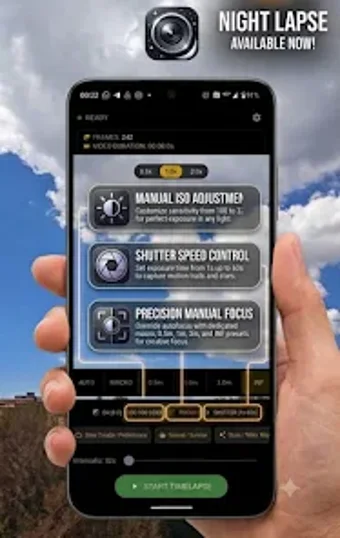
Nightlapse, developed by Daniele DAgostino, is an Android photography utility aimed at creators who need precise low-light time-lapse capture. The app captures high-resolution image sequences with native PRO controls for shutter, ISO, EV, manual focus and dynamic interval timing to prevent frame overlap. It renders MP4 videos on-device using an integrated FFmpeg engine and offers presets for sunsets, clouds, and star trails. Photographers and astrophotography enthusiasts get granular control and local processing suited for mobile night shooting.
What Nightlapse captures and how it controls the camera
The app exposes native PRO controls for shutter speed, ISO and EV compensation so the user sets exposure directly, then locks manual focus including an infinity preset for sky shots. For long-exposure astrophotography the tool permits exposures up to thirty seconds, collects high-resolution frames on-device, and uses an integrated FFmpeg engine to render those sequences into MP4 video at 30 fps without moving files off the device.
How interval timing prevents overlapping frames during long sessions
Nightlapse calculates a dynamic minimum interval from the current shutter speed so captures do not overlap or trigger frame-processing errors. The app updates that interval in real time while shooting and displays session time and estimated frame count in a monitoring header, which helps the user decide whether to extend or shorten a session. This calculation is specifically designed for low-light workflows where exposures approach each frame's duration.
Whether it can run unattended and keep data local for privacy
The app provides a background service that continues processing when the screen is off and a wakelock integration to prevent the device sleeping during captures, letting long sessions run unattended. Video rendering uses the on-device FFmpeg engine so frames and output stay local, supporting a privacy-focused workflow. Availability of manual controls and background behavior depends on the device's camera hardware and Camera2 API support.
Who benefits most and how much technical skill is required
Customizable presets let content creators start shoots without hand-tuning every parameter. The app includes presets for common scenes:
- sunsets
- fast clouds
- star trails
Practical recommendation for mobile night shooters
Nightlapse is a capable option for photographers and astrophotography enthusiasts who need precise, on-device time-lapse capture; its learning curve favors users comfortable adjusting exposure and focus. Expect to run brief test sequences before committing to multihour shoots to confirm composition and exposure behavior. Monitor battery level and available storage during extended sessions and plan captures during stable weather windows. Recommended.